
Key Takeaways
- The HP Moonshot S1260 (700365-001) is a single-node Atom server cartridge built for light, parallel, scale-out workloads, not heavy compute.
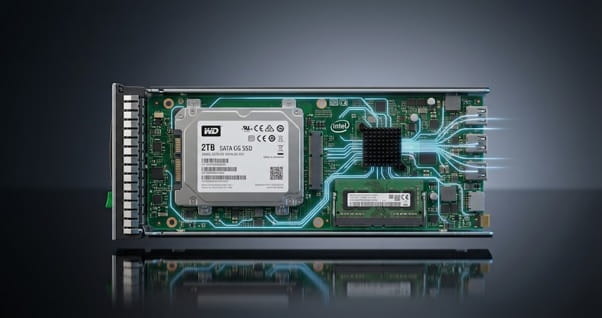
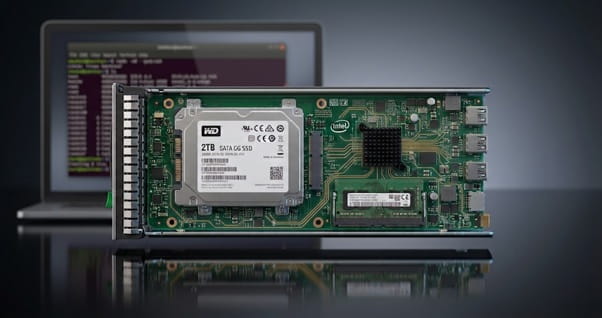
- Each cartridge offers 2 cores and 4 threads at 2.0 GHz, one ECC SO-DIMM slot (8GB maximum), one SFF drive, and dual 1GbE links to the chassis switches.
- It excels at web hosting, low-cost dedicated servers, caching, DNS, and test/dev labs, but it is a poor fit for dense virtualization or large databases.
- Max out memory at 8GB, choose an SSD for I/O-sensitive work, run two Moonshot switch modules for network redundancy, and test your Linux image first, since RHEL 9 and AVX-dependent software will not run.
- Refurbished cartridges deliver outstanding cost per node, provided you verify chassis firmware, switch compatibility, and drive health first.
- Direct Macro recommends the S1260 for budget scale-out projects and existing Moonshot estates; newer cartridges suit heavier workloads.
Overview
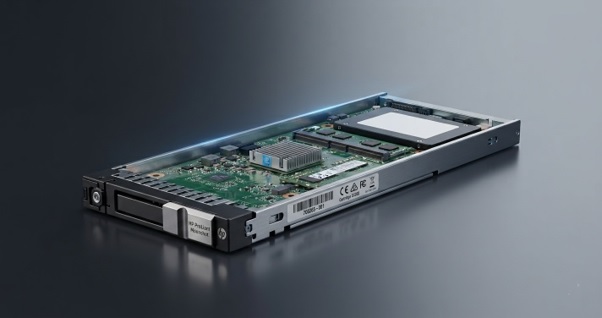
If you are shortlisting low-power, high-density compute for a scale-out data center, this HP Moonshot S1260 700365-001 review gives you a practical answer: what the cartridge does well, where it falls short, and how to deploy it without overspending. The S1260 was the first server cartridge HP shipped for the Moonshot 1500 System in 2013. It pairs an Intel Atom S1260 system-on-chip with up to 8GB of ECC memory and a single small-form-factor drive, all in a hot-pluggable cartridge that shares power, cooling, networking, and management with up to 44 other nodes in one 4.3U chassis.
The Direct Macro team works with IT managers, data-center engineers, system administrators, and procurement teams who source enterprise hardware every day. This HP Moonshot server review draws on that hands-on experience to explain HP Moonshot S1260 performance, specifications, use cases, and deployment best practices, so you can decide whether it belongs in your rack. You will also see this cartridge listed under related part numbers such as 708159-001, 708917-001, and 700352-B21; we explain how they relate below.
HP Moonshot S1260 700365-001 Review: Quick Verdict
The HP Moonshot S1260 (700365-001) is a low-power server cartridge for the HP Moonshot 1500 chassis. It uses a dual-core Intel Atom S1260 processor at 2.0 GHz, supports up to 8GB of DDR3 ECC memory and one SFF drive, and connects through dual 1GbE ports. It is best for lightweight, scale-out workloads such as web hosting, dedicated hosting, and test environments, where cost per node and energy efficiency matter more than single-thread speed.
Our HP S1260 Server Review Verdict: Excellent value for horizontal, lightweight workloads, but newer platforms outperform it on compute-heavy or memory-hungry applications.
Pros:
- Very low cost per physical node
- Low power draw and high density
- Hot-swap cartridges with shared management
Cons:
- 8GB RAM limit and one drive per node
- No SSE4.2 or AVX; RHEL 9 unlikely to install
- Requires a discontinued Moonshot 1500 chassis
HP Moonshot S1260 Specifications
The table below summarizes the core HP Moonshot S1260 specifications buyers should confirm before ordering.
| Component | Specification |
|---|---|
| Part number | 700365-001 (often cross-listed with spare part 708159-001) |
| Form factor | Hot-plug HP Moonshot server cartridge, single node |
| Processor | Intel Atom S1260, 2 cores / 4 threads, 2.0 GHz, 1MB cache, 8.5W TDP, Intel VT-x |
| Memory | 1 x 204-pin SO-DIMM slot, unbuffered ECC DDR3-1333 (PC3-10600), up to 8GB |
| Storage | 1 x 2.5-inch SATA drive (500GB/1TB HDD or SSD) via Marvell 9125 controller |
| Networking | Broadcom 5720 dual-port 1GbE, routed to the chassis switch modules |
| Management | Moonshot 1500 Chassis Manager (web GUI, CLI, IPMI); no VGA port on the cartridge |
| Compatible chassis | HP Moonshot 1500 System (45 cartridge bays, 4.3U) |
| OS support | 64-bit Linux distributions (verify current versions) |
| Chipset | Intel Atom Processor S1200 series for servers (system-on-chip) |
These specifications describe a lean, Linux-only node built for density rather than raw power.
Tip for Buyers: Before making a purchase, confirm that each listing includes the 8GB ECC SO-DIMM and a drive, because many refurbished cartridges ship without them.
HP Moonshot S1260 Part Number Cross-Reference
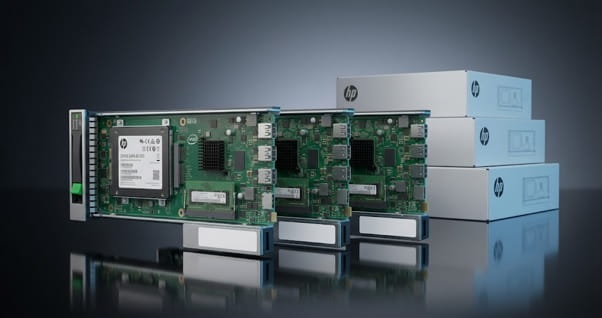
HP sold the S1260 as single cartridges, option kits, starter systems, and add-on multipacks, and each format carries its own part number. Knowing the difference helps you avoid costly ordering mistakes.
| Part Number | What It Refers To |
|---|---|
| 700365-001 | S1260 server cartridge assembly, often sold without memory or drive |
| 708159-001 | Spare part number for the ProLiant Moonshot S1260 cartridge, commonly cross-listed with 700365-001 |
| 708917-001 | Seller-listed spare number for S1260 cartridge assemblies; confirm contents with Direct Macro |
| 700352-B21 | Original HP option kit: S1260 cartridge with 8GB memory, no drive |
| 757645-B21 | Moonshot 1500 starter system with 15 S1260 cartridges and one Moonshot-45G switch |
| 758855-B21 | Add-on multipack of 15 S1260 cartridges for an existing chassis |
Buyers choose these part numbers to expand existing Moonshot chassis, replace failed nodes, or build low-cost hosting clusters. Tip: ask Direct Macro to confirm the exact part number, included memory, and drive before you order.
HP Moonshot Server Architecture: How the S1260 Cartridge Works
Traditional rack servers each carry their own power supplies, fans, NICs, and management controller. The HP Moonshot server architecture flips that model. The Moonshot 1500 chassis supplies shared power, cooling, switching, and chassis management, while each HP Moonshot server cartridge holds only what a node needs: processor, memory, storage, and network interfaces.
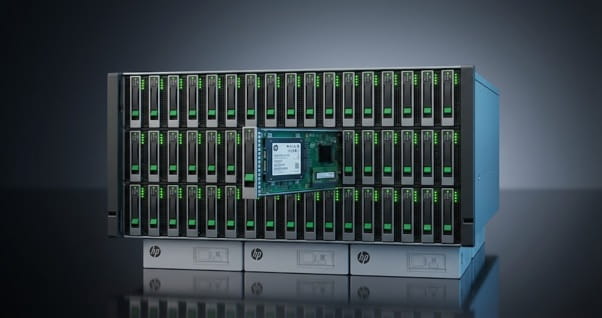
Each HP S1260 server cartridge connects across the chassis backplane to two switch slots, so every node gets two independent 1GbE paths. Administrators manage all cartridges through the Chassis Manager, which supports a web GUI, CLI, and IPMI, and the Moonshot Component Pack updates firmware in bulk.
The result is 45 independent servers in 4.3U of rack space, with far fewer cables, power cords, and fans to maintain than 45 standalone machines. Power comes from hot-plug supplies feeding a pooled-power backplane, and five dual-rotor, hot-plug, redundant fans cool the whole chassis, so a single fan or supply failure does not take nodes offline. A Chassis Manager failure does not stop running nodes; it only blocks configuration changes until you repair it.
· Management and Console Access
The S1260 cartridge has no VGA port or onboard iLO. Instead, the Moonshot 1500 Chassis Manager manages every node and handles power control, firmware, health monitoring, and serial console access over the network. Early chassis firmware also groups cartridges into separate management zones, so plan provisioning scripts around the chassis manager rather than per-node consoles. For installs, most teams use PXE boot and a master OS image rather than interactive setup.
HP Moonshot S1260 Performance: What to Expect
Efficiency, not raw speed, defines HP S1260 server performance. The Atom S1260 is a 32nm system-on-chip designed specifically for microservers. Its two cores with Hyper-Threading handle four lightweight threads comfortably, and its 8.5W processor TDP keeps per-node power draw low.
In practice, a single cartridge performs like an entry-level dedicated server. It serves static and lightly dynamic web pages, runs small application instances, and handles network services well. It struggles with single-thread latency, floating-point work, encryption-heavy traffic at scale, and any task that needs more than 8GB of memory. The real strength of the HP Moonshot Atom S1260 is aggregate throughput: 45 modest nodes working in parallel rather than one powerful machine.
Independent benchmarks support this. The Atom S1260 performs much like a desktop Atom N2800 and scores roughly 900 on common CPU benchmarks, a small fraction of a modern Xeon. At launch, HP claimed that Moonshot used up to 89% less energy and 80% less space than equivalent DL380 servers, and cost up to 77% less, for suitable workloads. At rack scale, ten chassis deliver 450 nodes, 900 cores, and 3.6TB of RAM.
HP Moonshot S1260 Operating System Compatibility
HP certified the S1260 for 64-bit Linux distributions available at launch, including Red Hat Enterprise Linux, SUSE Linux Enterprise Server, and Ubuntu. Today, OS choice is one of the most important pre-purchase checks, because the Atom S1260 is an older x86-64 design that lacks newer instruction-set extensions such as SSE4.2 and AVX.
- Likely to Work: Debian, Ubuntu LTS releases, and other distributions that still support the baseline x86-64 instruction set.
- Likely to Fail: RHEL 9 and its rebuilds, such as Rocky Linux 9 and AlmaLinux 9, which require the x86-64-v2 level.
- Application Limits: Some modern software, including recent database and AI builds, requires AVX and will not run on this CPU.
- Windows: HPE does not support Windows on this cartridge, so plan Linux-only deployments.
Buying Tip: Test your exact OS image on one cartridge before you order in volume.
Who Should Buy the HP Moonshot S1260?
The HP Moonshot S1260 delivers the most value to buyers who need many small, independent servers rather than one powerful machine. These four groups typically get the best return from this cartridge:

1. Hosting Providers Offering Dedicated Servers
Each cartridge is a physical server, so hosts can sell low-cost dedicated plans with true hardware isolation for every customer, and up to 45 clients fit in a single 4.3U chassis.
2. Data-Center Teams Running Scale-Out Web Tiers
Web front ends, caching layers, DNS resolvers, and load-testing nodes spread work across many machines. The S1260 handles these lightweight, parallel jobs while keeping power draw and rack space low.
3. Existing Moonshot 1500 Owners
If you already run Moonshot chassis, S1260 cartridges are an inexpensive way to replace failed nodes or add capacity using the same Chassis Manager, switch modules, and firmware tools.
4. Labs, Universities, and DevOps Teams
Training labs, CI pipelines, and test clusters need many bare-metal nodes on a small budget. The S1260 gives each student, build job, or test environment its own real server at a very low cost.
Who Shouldn’t Buy It?
The S1260 is a specialist, and buying it for the wrong workload leads to frustration. If any of the following describes your needs, a newer cartridge or a standard rack server is the better choice:
1. Teams Needing High Single-Thread Performance
The Atom S1260 lacks modern instruction sets such as SSE4.2 and AVX, and its per-core speed is low, so analytics, AI inference, and compute-heavy applications will run slowly or not at all.
2. Buyers Without a Moonshot Chassis
The cartridge cannot run on its own. If you need only one general-purpose server, buying a chassis, switch modules, and power supplies costs far more than a single entry-level 1U server.
3. Windows Server and Vendor-Certified OS Environments
HPE does not support Windows Server on this cartridge, and current enterprise Linux releases such as RHEL 9 are unlikely to install, so organizations that require vendor-certified OS support should choose newer hardware.
4. Memory or Storage-Heavy Workloads
Each node tops out at 8GB of RAM and one drive with no local RAID, so large databases, file servers, and memory-hungry applications need a platform with more DIMM slots and drive bays.
HP Moonshot S1260 Use Cases: Virtualization, Hosting, and Databases
Before you commit, it helps to know exactly where the S1260 fits. Below, we assess how the cartridge handles three common workloads (virtualization, hosting, and databases) and give a clear verdict for each.
1. Is It Suitable for Virtualization?
Only in limited cases. The Atom S1260 supports Intel VT-x, but two cores and an 8GB memory ceiling leave little room for multiple virtual machines. Lightweight containers or one or two small KVM guests work well for lab use. For production virtualization, a Xeon-based platform with more cores and memory is a better investment.
2. Is It Suitable for Hosting?
Yes, and this is where the S1260 shines. HP designed the cartridge for web serving, and each node can host static sites, small WordPress or LAMP stacks, mail relays, or a dedicated server per client. Physical node isolation is a strong selling point for hosts who want to avoid the noisy-neighbor issues common on shared VPS platforms.
3. Is It Suitable for Databases?
For small databases, yes; for production OLTP or analytics, no. A single node can run a lightweight MySQL, PostgreSQL, or Redis instance for a small application, especially with an SSD. Large datasets, heavy joins, and high concurrency will quickly hit the CPU and memory limits.
Recommended Configuration: RAM, Storage, and Networking
The right configuration has a big impact on how well each S1260 node performs. This section explains how much memory to install, which drive to choose, and how to set up chassis networking for reliability.
How Much RAM Makes Sense?
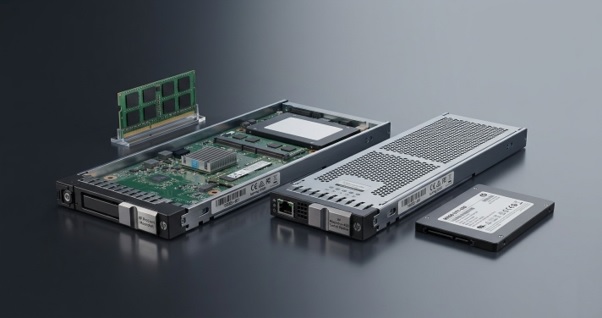
Install a full 8GB ECC SO-DIMM in every cartridge. On the refurbished market, 8GB modules cost little more than 4GB modules, and the extra memory improves page caching, database buffers, and headroom for containers. Always use ECC modules that match HP’s qualified memory list.
2. Which Storage Configuration Makes Sense?
Each cartridge holds one SFF drive, so match the drive to the workload:
- SSD (120GB–480GB): Best for web hosting, small databases, and fast boot and provisioning times.
- HDD (500GB–1TB): Suitable for log collection, archives, or bulk file serving where capacity matters more than speed.
- Network storage: Use NFS, iSCSI, or object storage for data that must survive a node failure, because there is no local RAID.
3. What Networking Configuration Should Buyers Consider?
Install two Moonshot switch modules, such as the Moonshot-45G Switch Module, so each cartridge’s dual 1GbE ports reach separate switches for redundancy. Each Moonshot-45G module provides 45 1GbE downlinks, one per cartridge, plus six 10Gb SFP+ uplinks, so size the uplinks to your aggregate traffic. Because the S1260 is a single-node cartridge, it works with the 45G switch; multinode cartridges require the larger 180G switch. If you mix cartridge generations, note that 10G-capable cartridges drop to 1G when they share a chassis with 1G cartridges. Upstream, a reliable top-of-rack or aggregation switch from Direct Macro’s network switches category completes the design.
Is Refurbished HP Moonshot S1260 Hardware Worth Considering?
For most buyers, yes. HPE no longer sells the Moonshot platform new, so the secondary market is now the main source of S1260 cartridges. Refurbished units offer an extremely low cost per server node, and the cartridge has few moving parts apart from the drive. The trade-off is warranty and lifecycle support, so buy from a supplier that tests every cartridge, replaces worn drives, and backs the hardware with its own warranty. Our server specialists can share test results and warranty terms before you order.
What Should You Check Before Purchasing?
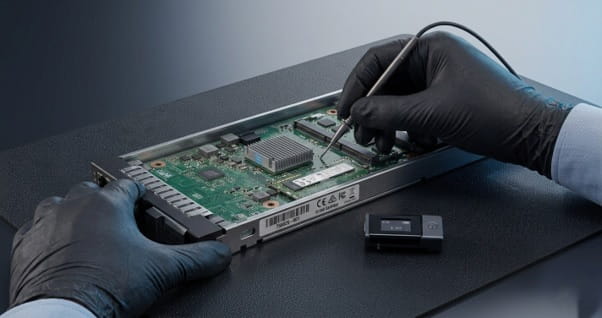
Because the S1260 is discontinued and mostly sold refurbished, a careful pre-purchase check protects your budget. Use the checklist below to confirm compatibility, condition, and support before you place an order.
- Part Number:Confirm 700365-001 or the matching spare number required for your chassis.
- Chassis and Firmware:Verify that your Moonshot 1500 Chassis Manager and Component Pack support the S1260.
- Switch Modules:Confirm that installed switch and uplink modules work with single-node 1GbE cartridges.
- Memory and Drive:Check whether the listing ships with RAM and a drive, or as “no memory” or “no HDD.”
- Testing and Warranty:Request burn-in results, drive SMART data, and written warranty terms.
- Operating System Plan:Confirm that your Linux distribution and kernel run reliably on the Atom S1260.
How to Deploy the HP Moonshot S1260: Step by Step
A well-planned rollout saves hours of troubleshooting later. Follow these six steps to rack, configure, and provision your Moonshot 1500 chassis so every S1260 cartridge comes online quickly and reliably.
· Step 1: Plan the Rack and Environment
The Moonshot 1500 chassis is 4.3U, so use the HP 4.3U rail kit and spacer blank. Keep inlet air between 10°C and 35°C (50°F–95°F) and confirm power capacity. Three chassis fit in 13U of rack space.
· Step 2: Install Power, Fans, Management, and Switches
Install the power supplies, fans, and Chassis Management module, then fit two Moonshot-45G switch modules with uplinks for redundant networking.
· Step 3: Update All Firmware
Update the Chassis Manager, switch, and cartridge firmware using the latest Moonshot Component Pack before you bring any nodes into service. HPE firmware downloads may require a support entitlement, so confirm access before you buy.
· Step 4: Insert and Verify Cartridges
Insert cartridges fitted with 8GB ECC memory and an SSD or HDD, then confirm each node appears and reports healthy in the Chassis Manager. Place cartridges with spinning drives toward the front for the coolest airflow.
· Step 5: Configure Networking and Install the OS
Configure switch VLANs and uplinks, then PXE-boot a tested master Linux image to every node instead of installing each one by hand.
· Step 6: Automate, Monitor, and Keep Spares
Automate provisioning and monitoring with IPMI or the chassis CLI, and keep spare cartridges on hand for fast hot-swap replacement.
Common HP Moonshot S1260 Issues and Fixes
Most S1260 problems trace back to firmware, drives, or seating:
- Cartridge Missing from the Chassis Manager: Reseat it, then update Chassis Manager firmware.
- Node Will Not Boot: Check the SO-DIMM and drive, then review the serial console.
- Drive Errors: Replace the drive and check SMART data on spares.
- Loud Fans: Fill empty bays with cartridge blanks to restore airflow.
HP Moonshot S1260 Price and Cost per Node
The table below gives typical secondary-market price ranges to help you budget:
| Item | Typical Used Price Range* |
|---|---|
| S1260 cartridge, no memory or drive | $25–$45 |
| S1260 cartridge with 8GB RAM and 500GB–1TB drive | $150–$200 |
| Complete Moonshot 1500 chassis bundle | Varies widely with switches, power supplies, and cartridge count |
*Note: We observed these prices on the secondary market at the time of writing. Check current Direct Macro stock for exact quotes.
At launch in 2013, a Moonshot 1500 with 45 S1260 nodes started at US$61,875. Today, each server node costs far less than any standalone 1U server. When you budget, include the chassis, two switch modules, power supplies, rails, and spare cartridges, and request a volume quote from Direct Macro to lower your cost per node.
HP Moonshot S1260 vs. Similar Enterprise Servers
Here is how the S1260 compares with its Moonshot siblings and a standard entry-level rack server:
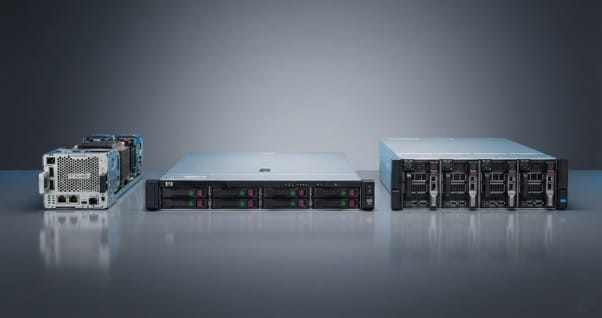
| Server | Best For | Key Difference |
|---|---|---|
| HP Moonshot S1260 | Light hosting, test/dev | Lowest cost per node; 2 cores, 8GB max |
| HPE ProLiant m300 | Denser web tiers | 8-core Atom C2750, up to 32GB RAM |
| HPE ProLiant m710x | Media, VDI, app hosting | Xeon E3 with integrated graphics; far higher performance |
| 1U entry server (e.g., ProLiant DL20) | General-purpose workloads | Standalone; more RAM and drives, but more space and power per node |
Against its Moonshot siblings, the S1260 trades performance for price. Against standalone 1U servers, it trades flexibility for density, lower power draw, and shared infrastructure.
What Does Direct Macro Recommend?
Direct Macro recommends the HP Moonshot S1260 for three scenarios: maintaining or expanding an existing Moonshot 1500 estate, launching budget dedicated-hosting plans, and building bare-metal test clusters. For a successful HP Moonshot S1260 deployment, configure each node with 8GB of ECC RAM and an SSD, run dual switch modules, and stock a few spares for fast replacement. If your workloads need virtualization density or database horsepower, choose a newer cartridge or a Xeon rack server instead.
Ready to build your cluster? Browse the 700365-001 – HP Moonshot product page at Direct Macro for tested stock, current pricing, and expert support from our server specialists.
Final Thoughts
This HP Moonshot S1260 review comes down to one point: the S1260 is a specialist, not a generalist. For web hosting, dedicated-server plans, and test clusters, it delivers dense, efficient, and affordable bare-metal nodes that few platforms can match on cost per server.
It is not the right choice for heavy virtualization, large databases, or compute-heavy work, and buyers should confirm Linux compatibility before ordering. When you match it to the right workload, however, it remains a cost-effective building block for scale-out infrastructure.
Ready to scale out for less? Order the 700365-001 – HP Moonshot server cartridge from Direct Macro today for tested stock, competitive pricing, fast shipping, and expert help from our server specialists.
Frequently Asked Questions
- What is the HP Moonshot S1260 700365-001?
It is a single-node server cartridge for the HP Moonshot 1500 System, powered by a dual-core Intel Atom S1260 processor at 2.0 GHz with up to 8GB of ECC memory and one SFF drive.
- How many S1260 cartridges fit in one Moonshot chassis?
The 4.3U Moonshot 1500 chassis holds up to 45 cartridges, giving you 45 independent servers that share power, cooling, and switching.
- What is the maximum RAM for the HP Moonshot S1260?
Each cartridge supports up to 8GB of DDR3 ECC memory through a single SO-DIMM slot.
- Can the HP Moonshot S1260 run Windows Server?
No. HP designed and certified the cartridge for 64-bit Linux and does not support Windows Server on it, so plan Linux-only deployments.
- Is the HP Moonshot S1260 still supported?
HPE has discontinued the Moonshot platform, so specialist suppliers such as Direct Macro now provide tested stock, replacement parts, and refurbished-hardware warranties.
- What replaced the HP Moonshot S1260?
Within Moonshot, HPE followed the S1260 with the Atom C2750-based m300 and later Xeon cartridges such as the m710x. Outside Moonshot, modern Xeon D, Atom C3000, or entry 1U servers are the usual replacements.
- How do you access the console on an S1260 cartridge?
The cartridge has no VGA port. You access each node’s serial console and power controls through the Moonshot 1500 Chassis Manager over SSH, the web GUI, or IPMI.
- Does the Moonshot 1500 chassis need a special rack?
The chassis is 4.3U tall, so it uses HP’s 4.3U rail kit and a spacer blank to fit standard racks while maintaining correct airflow.
- Can the HP Moonshot S1260 run RHEL 9 or Proxmox?
RHEL 9 and its rebuilds require x86-64-v2 instructions that the Atom S1260 lacks, so they are unlikely to install. Debian-based systems are a better fit, but test any hypervisor on one node first.